Gift Tracker Template I Excel: A Practical Tool for Managing Gift Lists and Budgets
Keeping track of gifts for birthdays, holidays, weddings, and other occasions can become surprisingly complex. Between remembering dates, noting what you bought for whom, and staying within a spending plan, the process often demands more attention than expected. The Gift Tracker Template I Excel aims to solve this by offering a structured spreadsheet that centralizes gift planning, expense tracking, and date reminders in one file. Designed for Microsoft Excel users, this template provides a straightforward way to manage gift-related tasks without requiring specialized software or advanced spreadsheet skills.
What makes this template worth discussing is its focus on simplicity and automation. Rather than juggling multiple notes, calendars, or budgeting apps, you have a single workbook that handles the core functions. This article examines the template's key characteristics, practical value, usability, and who might benefit most from incorporating it into their routine.
What the Gift Tracker Template I Excel Includes
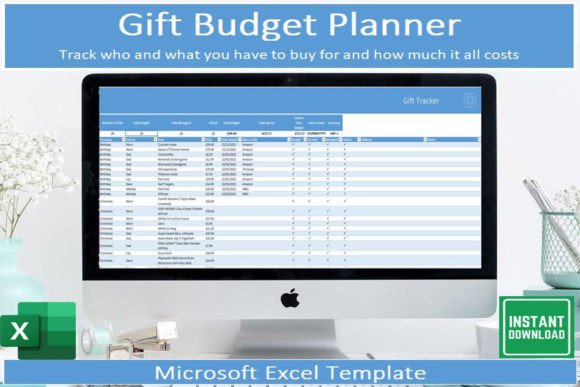
The template comes as a digital download for Microsoft Excel and includes several components that work together. The main gift tracking tab allows you to log recipients, occasions, gift ideas, purchase status, and actual spend. Automated totals calculate your spending per event or over a period, so you do not need to manually sum amounts. A separate dates tab lists important occasions, helping you avoid missing a birthday or anniversary. The dashboard section displays automated graphs that visualize your spending patterns and upcoming events.
Additional flexibility comes from built-in controls. You can switch between three currencies—pounds, dollars, and euros—with a single click. Similarly, the date format can toggle between day-month-year (31 12 2024) and month-day-year (12 31 2024). These options make the template adaptable whether you live in the UK, US, Europe, or elsewhere. The file also includes instructions explaining each section and how to use it, which reduces the learning curve for anyone unfamiliar with spreadsheet templates.
Centralized Gift Management
One of the main strengths of the Gift Tracker Template I Excel is that it replaces scattered information. Instead of keeping gift ideas in a notes app, dates on a calendar, and spending in a budgeting tool, everything resides in one file. This centralization reduces the risk of forgetting a purchase or overspending because you can see the full picture at a glance. For anyone who buys gifts for multiple people across several events, this alone saves time and mental energy.
Automated Calculations and Visuals
The automated spend totals are a practical feature. As you enter amounts in the gift tracking tab, the template updates totals without requiring formulas or manual addition. This is especially useful if you are working within a budget for a holiday season or a set of events. The dashboard graphs provide a visual summary of your spending, which can help you identify where your money is going and adjust plans accordingly. While the graphs are not overly complex, they serve the purpose of giving you a quick overview without needing to create charts yourself.
Currency and Date Format Flexibility
Not all templates offer currency switching. The ability to toggle between GBP, USD, and EUR at the click of a button is a thoughtful addition. It means the same file works regardless of where you are based or where you are buying gifts from. The date format option is similarly practical for international users or those who work with different regional conventions. These small customizations make the template feel tailored rather than generic.
Real-World Usability and Performance
In practice, the template performs well for its intended purpose. Setting it up takes only a few minutes: download the file, open it in Excel, and follow the instructions. Data entry is straightforward, with clearly labeled columns for recipient, occasion, date, gift idea, status, and cost. The dropdown menus for status (bought, wrapped, given, etc.) add a layer of organization without complicating the process. Because the template uses standard Excel features, it runs smoothly on both Windows and Mac versions of Excel, as well as on the mobile app for iOS and Android.
Using the template on a mobile device is a practical advantage. If you are shopping and see a potential gift, you can record it immediately in the Excel app. This reduces the need to remember details until you get back to a computer. The mobile experience is not as polished as a dedicated app, but for basic data entry and review, it works well. The instructions provided with the download are clear enough that even someone with limited Excel experience can get started without frustration.
Limitations to Consider
No tool is perfect, and the Gift Tracker Template I Excel has a few limitations worth noting. First, it requires Microsoft Excel. If you do not have access to Excel, you cannot use the template’s full functionality. Free spreadsheet programs like Google Sheets or LibreOffice may not support all features, particularly the currency and date format toggles. Second, the template is designed for personal use only, as stated in the terms. It cannot be shared or resold, which is fine for individual users but might be a constraint for small businesses or groups that want to collaborate on gift planning.
Another consideration is that the template does not include advanced analytics or integration with other tools. You will not find automatic syncing with your calendar or email reminders. The graphs are simple bar charts and pie charts rather than interactive dashboards. For users who need deep data analysis or automation, this template may feel basic. However, its simplicity is also its strength: it does exactly what it promises without overcomplicating the experience.
Who Benefits Most from This Template
The Gift Tracker Template I Excel is best suited for individuals and households who want a practical, low-cost solution for managing gift lists and budgets. It is especially useful for:
- Busy professionals who have limited time to plan gifts and need a quick way to organize purchases across multiple events.
- Parents and family members who buy gifts for several children, relatives, and friends throughout the year and want to avoid duplicate purchases or forgotten dates.
- Freelancers and small business owners who appreciate spreadsheet-based tools and prefer a straightforward system over complex project management software.
- Event planners and volunteers who coordinate gifts for group occasions such as office parties, family reunions, or community events.
- Anyone who values budgeting and wants to track gift spending without using a full-blown budgeting app.
For these users, the template fills a clear gap. It is more organized than a paper list or a collection of notes, but simpler than dedicated gift planning apps that often come with subscriptions or steep learning curves.
Comparing to Alternatives
There are other ways to track gifts, such as using a general spreadsheet, a note-taking app, or a dedicated gift list app. A general spreadsheet gives you full control but requires you to build the structure and formulas yourself. The Gift Tracker Template I Excel saves that setup time by providing a pre-built system with automation already included. Note-taking apps are convenient for ideas but lack budgeting and date tracking. Dedicated gift apps often have subscription fees or limited free tiers, and they may not offer the same level of customization. This template sits in a middle ground: it is affordable, one-time purchase with no recurring costs, and it gives you the flexibility of Excel.
Practical Recommendations for Getting the Most Out of the Template
To maximize the value of the template, consider a few practices. First, set aside a few minutes at the start of each month to review upcoming events and update gift ideas. This keeps the information current and prevents last-minute scrambling. Second, use the date tab as your primary calendar for gift-related occasions, even if you maintain a separate personal calendar. The dedicated view helps you focus specifically on gift planning. Third, review the dashboard graphs after each major spending period to see where your budget went and adjust future plans accordingly. Finally, take advantage of the currency toggle if you buy gifts from international websites or travel frequently—it ensures your spending totals remain accurate without manual conversion.
One limitation to be aware of is that the template does not sync across devices automatically. If you use it on both a desktop and mobile device, you will need to transfer the file manually or use a cloud storage service like OneDrive, Dropbox, or iCloud to keep the latest version accessible. This is a minor extra step but worth noting for users who expect real-time synchronization.
Long-Term Value and Overall Verdict
The Gift Tracker Template I Excel offers solid long-term value for its price point. Because it is a downloadable Excel file, it does not expire or require a subscription. You can use it year after year by simply clearing the data and starting fresh, or by keeping a cumulative history of your gift giving. The ability to change currencies and date formats means it remains relevant even if your location or circumstances change. The automated calculations and graphs continue to function as long as you use a compatible version of Excel.
For anyone seeking a simple, effective way to organize gift buying without adding complexity, this template is a practical choice. It delivers on its core promise: a centralized, easy-to-use tool that tracks gifts, dates, and spending in one place. While it is not a replacement for a full budgeting suite or a collaborative planning tool, it excels at what it sets out to do. If your gift planning has become a source of stress or disorganization, the Gift Tracker Template I Excel provides a straightforward path to getting it under control.
The template is available for personal use only and cannot be shared or resold, which supports the creator’s small business. If you have any questions about the template, the creator encourages you to reach out directly. For those who prefer a hands-on spreadsheet approach and value simplicity, this is a recommendation worth considering.