Nominase PowerPoint Template: Presentations That Connect
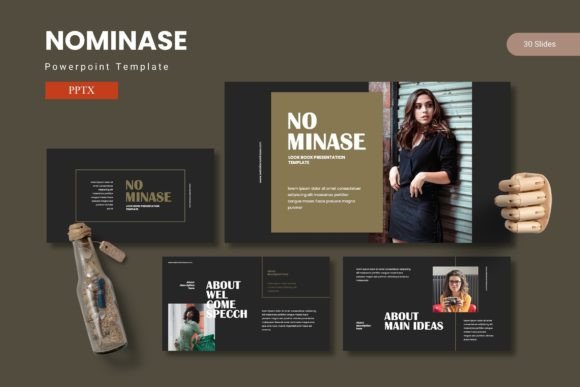
Creating a presentation that truly lands with your audience takes more than just good data. You need a structure that guides the eye, visuals that reinforce your message, and a consistent look that signals professionalism. The Nominase PowerPoint Template is built to handle exactly that. With 150 total slides spread across five pre-made color schemes, it gives you a flexible foundation for everything from a quick client update to a detailed portfolio review. Instead of wrestling with alignment and font choices, you can focus on what you want to say.
What the template actually includes
Before diving into who might use it and why, it helps to know what is inside the download. The package comes with five separate PowerPoint files—one for each color variation. Each file holds 30 slides, giving you a total of 150 slides across the entire collection. You also get section break slides, handcrafted infographics, pixel-perfect illustrations, and picture placeholders that let you drag and drop images. Everything is resizable and editable because it is built on master slides. That means changing one element on the master updates every slide that uses it, saving you hours of manual repetition. The folder also includes a readme file with font and photo information so you have everything you need to get started.
Why different users look at the same template differently
A single template can serve very different purposes depending on who is using it. The key is understanding which features matter most for your specific situation.
For beginners who feel overwhelmed by design
If you are new to creating presentations, the sheer number of options in PowerPoint can be paralyzing. You might start with a blank slide and spend thirty minutes just trying to make text and an image look balanced. Nominase removes that guesswork. The pre-built layouts give you a clear place for your headline, your bullet points, your chart, or your photo. You simply replace the placeholder content with your own. The five color schemes mean you do not have to worry about whether your colors clash—they were chosen to work together. For a first-time presenter preparing a school project or a community talk, this template reduces friction. You can open the file, drop in your content, and have a polished slide deck in under an hour. The learning curve is shallow because the template works exactly like any other PowerPoint file you have used.
For busy professionals who need speed and consistency
When you are preparing a weekly status report or a quarterly business review, you cannot afford to redesign your slides from scratch every time. You need a system that keeps your branding consistent while letting you swap out content quickly. The master slide structure in Nominase is a real advantage here. You set your company colors and logo once on the master, and every slide automatically respects that setup. The 30 slides per color variation give you enough layouts to cover most business scenarios: title slides, agenda pages, data charts, comparison tables, team introductions, and closing calls to action. If you present to different departments or clients, you can use a different color scheme for each without starting over. The time saved adds up fast, especially if you produce presentations weekly.
For creators and marketers who rely on visual impact
If you are a content creator, freelancer, or marketer, your presentation is often part of a larger brand experience. You might be pitching a campaign idea, showcasing a portfolio, or presenting social media analytics to a client. Visual polish matters because it reflects on your own brand. Nominase includes handcrafted infographics and pixel-perfect illustrations that look clean on screen and in print. The gallery and portfolio slides are designed specifically for showing images—whether that is photography, product shots, or mockups. The drag-and-drop picture placeholders keep your images properly cropped and aligned without distorting them. For a designer or creative director, the flexibility of resizing and recoloring every graphic element means you can adapt the template to match your existing brand guidelines rather than forcing your brand into a rigid template shape.
For educators and trainers who need clarity and structure
Teaching a concept or training a team requires slides that break down information without overwhelming the viewer. Section break slides are particularly useful here because they give your audience a mental reset before you move to a new topic. You can use them to separate modules in a workshop or chapters in a lecture. The infographic slides help visual learners grasp relationships, timelines, and processes more easily than a wall of text. If you teach the same course repeatedly, you can build a library of slide decks using the same template, so students get a consistent visual experience even when the content changes. The five color variations also let you color-code different courses or difficulty levels, which helps both you and your audience stay oriented.
For small business owners who juggle multiple roles
Running a small business means you are the marketing department, the sales team, and the operations manager all at once. You do not have time to learn advanced PowerPoint tricks or hire a designer for every pitch. What you need is a template that works for multiple purposes. Nominase can serve as your sales deck for investor meetings, your product catalog for trade shows, your onboarding guide for new hires, and your annual report for stakeholders. Because the graphics are editable, you can repurpose the same slide layouts for different messages. The readme file with font and photo information also helps you stay organized—you will know exactly which resources you used, so you can replicate the look later. For someone who values practicality over flair, this template delivers commercial value because it replaces the need for multiple separate templates.
Practical priorities when evaluating the template
Not every feature matters equally to every user. Here is how different people might weigh the same aspects differently.
- Ease of use is the top priority for beginners and busy professionals. If you want to open the file and produce a slide in five minutes, the drag-and-drop placeholders and master slide logic are your best friends. You do not need to read a manual or watch a tutorial. Just replace text and images.
- Quality and visual polish matter most to creators and marketers. The handcrafted infographics and pixel-perfect illustrations give a custom look without the custom price tag. For a client-facing deck, that level of refinement builds trust and credibility.
- Flexibility and customization are critical for designers and educators. Being able to change colors, resize graphics, and adapt layouts means you are not locked into someone else's design choices. You can make the template truly yours.
- Cost-effectiveness resonates with small business owners and freelancers. One template that covers sales, marketing, training, and reporting is cheaper than buying four separate templates or paying a designer for custom work. The long-term usefulness is high because you can reuse it across projects and years.
- Speed of production matters when you are under deadline. Having 150 slides to choose from means you rarely need to build something from scratch. You pick the closest layout, tweak it slightly, and move on.
How to decide if Nominase fits your specific needs
The best way to know whether a template works for you is to match its strengths to your typical presentation tasks. Start by listing the three most common types of presentations you create. Are they data-heavy, image-heavy, or text-heavy? Nominase handles all three well, but the infographic and gallery slides are particularly strong for data and images. If your presentations are mostly bullet points with occasional photos, even the simpler layouts in the set will serve you well.
Next, consider your audience. If you present to executives or clients who expect a polished look, the five color schemes and consistent slide structure help you appear organized and credible. If you present to colleagues or students, the section breaks and clear hierarchy make your content easier to follow. The template adapts to the room without requiring you to change your approach.
Also think about your own skill level and how much time you want to invest. Beginners will appreciate that the template works out of the box. Experienced users will appreciate that there is room to push the design further by editing graphics, layering elements, or integrating their own branding. The template does not hold you back if you want to grow your skills over time.
Real-world examples of the template in action
A freelance graphic designer might use the portfolio slides to showcase client work, with each image kept clean and consistent thanks to the picture placeholders. They choose one color scheme for their main portfolio and a second for proposal decks, keeping their brand recognizable across both.
A marketing manager at a mid-sized company uses the data slides to present campaign results. The handcrafted infographics turn boring numbers into a story that stakeholders understand immediately. The master slides let the manager update the deck each month without redoing the layout.
A university instructor teaching an introductory course uses the section break slides to separate each week's module. Students appreciate the clear visual cues, and the instructor can reuse the same template across semesters, only updating the content. The five color variations let the instructor assign a different color to each course, reducing confusion when switching between classes.
A first-time entrepreneur preparing a pitch for a local business competition uses the clean title slides and agenda pages to structure a fifteen-minute talk. The template gives them a professional look without requiring design skills, so they can focus on practicing their delivery.
What makes this template a practical long-term resource
A template is only useful if it actually saves you time and improves your output. Nominase does both by removing the friction of starting from a blank slide and by giving you layouts that are already tested for visual balance. Because everything is built on master slides, you can make global changes in seconds. Because the graphics are resizable and editable, you are never stuck with a design element you cannot adjust. The five color schemes give you variety without forcing you to redesign your entire brand every time you switch. For anyone who creates presentations regularly—whether that is once a week or once a quarter—this template becomes a reliable tool you can reach for again and again. It does not promise to make you a designer overnight, but it does remove the obstacles that slow you down and distract you from your message. And for most people, that is exactly what a good template should do.