Emotions Log Canva Template: A Practical Tool for Emotional Awareness and Personal Growth
Keeping track of your emotions might sound like a simple exercise, but it can transform the way you understand yourself, your reactions, and your daily patterns. Whether you are a coach guiding clients through self-discovery, a creator documenting your creative ebbs and flows, or a business owner navigating stress and decision-making, an Emotions Log Canva Template offers a structured yet flexible way to capture what matters most. This article explores what this template offers, how it works, who benefits from it, and how you can make it your own.
What Is an Emotions Log and Why Does It Matter?
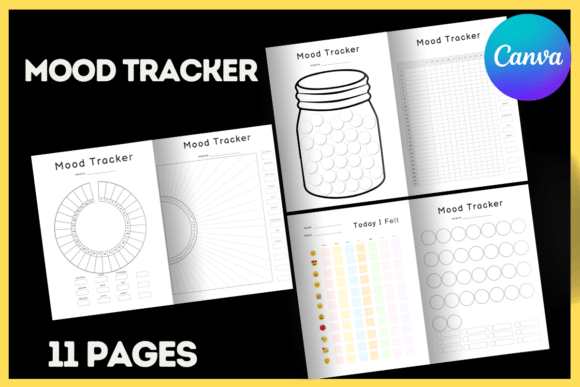
An emotions log is a record of how you feel over time. It goes beyond simple journaling by encouraging you to note the intensity, triggers, and context of each emotion. When you use an Emotions Log Canva Template, you get a pre-designed layout that saves you from starting from scratch. Instead of wrestling with formatting or wondering how to structure your entries, you can focus entirely on the content.
Why does this matter? Because emotional awareness is linked to better mental health, improved relationships, and more effective communication. By logging your emotions regularly, you start to see patterns. You might notice that certain times of day, specific tasks, or particular people consistently affect your mood. This insight allows you to make intentional changes rather than reacting on autopilot.
Exploring the Emotions Log Canva Template: Features and Characteristics
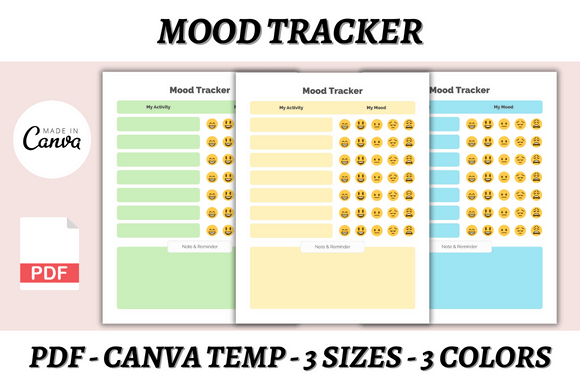
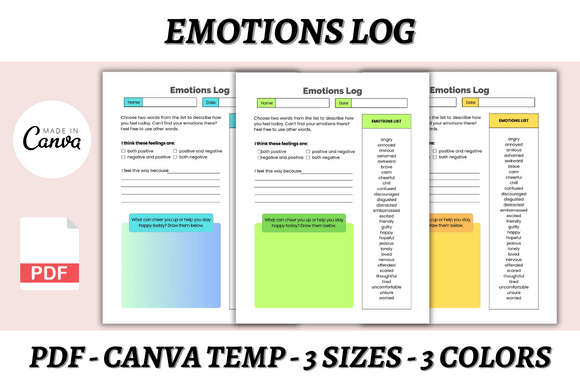
The Emotions Log Canva Template is designed to be both practical and visually appealing. It comes in three sizes—A4, A5, and US Letter—so you can choose the format that suits your printing or digital workflow. Each size is available in three color variations, giving you flexibility without overwhelming you with choices.
What You Get with the Template
- Three Canva templates in A4, A5, and US Letter formats
- Three PDF files corresponding to each size, ready for instant download
- Three color options to match your personal style or brand
- Lifetime access after purchase, so you can revisit and reuse as needed
- Instant download for immediate use
The templates are fully editable in Canva, which means you can change fonts, sizes, colors, layout style, and even add your own logo. This is especially useful if you plan to sell the template as your own product on platforms like Shopify, Gumroad, or your own website.
Who Benefits Most from an Emotions Log Template?
While anyone can benefit from emotional tracking, certain groups find the Emotions Log Canva Template especially valuable.
Coaches and Therapists
If you work with clients on emotional regulation, stress management, or personal development, a structured log gives clients a concrete tool to use between sessions. It also provides you with data to discuss during appointments. The editable nature of the template means you can customize it to match your coaching framework or therapeutic approach.
Content Creators and Bloggers
Creators often experience emotional highs and lows tied to their work—excitement about a new project, frustration with technical issues, or anxiety about audience reception. Using an Emotions Log Canva Template helps you track these patterns and identify what fuels your creativity versus what drains it. You can also repurpose the template as a freebie or paid product for your audience.
Business Owners and Entrepreneurs
Running a business is emotionally demanding. Decision fatigue, client interactions, and financial pressures all take a toll. A simple log can help you spot when stress is building and take proactive steps to recharge. The template’s professional look also makes it suitable for team wellness initiatives or as part of a leadership toolkit.
Etsy and Shopify Storekeepers
If you sell digital products, this template is a ready-made item you can brand and offer to your customers. Because it comes with lifetime access and instant download, it is an attractive product for buyers looking for practical tools. The included PDF files mean you can sell it without requiring customers to have a Canva account.
Real-World Scenarios: How People Use This Template
To give you a clearer idea of how the Emotions Log Canva Template works in practice, here are three common scenarios.
Scenario 1: The Weekly Check-In
Emma is a freelance designer who sometimes feels burned out without understanding why. She uses the A5 version of the template, prints several copies, and keeps them in her notebook. Every Friday afternoon, she spends ten minutes logging the emotions she experienced during the week. After a month, she notices that client revisions consistently trigger frustration. Armed with this insight, she sets clearer boundaries around revision rounds and feels less drained.
Scenario 2: The Coaching Handout
Marcus is a life coach who works with clients on emotional intelligence. He customizes the US Letter version of the template with his brand colors and logo, then shares it as a PDF with new clients. He asks them to complete one entry per day for two weeks. During coaching calls, they review the logs together to identify recurring triggers and develop coping strategies. The template saves Marcus hours of design time and gives clients a polished, professional tool.
Scenario 3: The Digital Product
Sophia runs a small Etsy shop selling planners and printables. She purchases the Emotions Log Canva Template, edits the fonts and colors to match her brand, and lists it as a digital download. Because the template comes with multiple sizes and color options, she can offer variety without creating each file from scratch. Her customers appreciate the instant download and the ability to edit the template themselves in Canva.
How to Edit and Customize Your Template in Canva
Editing the template is straightforward, even if you have never used Canva before. You only need a free Canva account to get started.
- Sign up or log in at canva.com using a free account.
- Open the template you purchased. You will see the pre-designed layout with placeholder text and colors.
- Change the fonts by clicking any text box and selecting a new typeface from the toolbar.
- Adjust colors by clicking on any element and using the color picker to match your brand or personal preference.
- Add your logo by uploading an image and dragging it into place.
- Resize or rearrange elements as needed. Canva’s drag-and-drop interface makes this simple.
- Download your finished design as a PDF, PNG, or JPG, depending on how you plan to use it.
Because the template is delivered as a Canva template file (via a shareable link), you retain lifetime access and can revisit it anytime. New design ideas often emerge as you become more comfortable with the tool, and you can always experiment with different layouts.
Strengths and Considerations of Using a Pre-Made Template
No tool is perfect for everyone, so it helps to look at both the strengths and limitations of the Emotions Log Canva Template.
Strengths
- Time savings: You skip the design process entirely and jump straight to customization.
- Professional appearance: The templates are designed with clean layouts and thoughtful typography.
- Flexibility: Multiple sizes and color options mean you can use the same template for different purposes.
- Commercial use: You can sell the template as your own product on your website, Shopify, Gumroad, or other marketplaces.
- Low barrier to entry: Only a free Canva account is required, and instant download gives you immediate access.
Considerations
- Canva dependency: To edit the template, you need internet access and a Canva account. Offline editing is not supported.
- Customization limits: While you can change colors, fonts, and layout, the core structure of the template is fixed. If you need a radically different format, you may need to start from scratch.
- Learning curve for beginners: Canva is intuitive, but first-time users may need a few minutes to explore the interface before feeling comfortable.
How to Choose the Right Template for Your Needs
When evaluating whether the Emotions Log Canva Template suits your project, consider three factors: format, visual style, and intended use.
Format
If you plan to print the log and keep it in a binder or notebook, the A4 or US Letter sizes are ideal. If you prefer a compact version that fits in a pocket or small journal, the A5 size is a better choice. All three formats are included, so you can test which one works best.
Visual Style
The template comes in three color options. Think about where and how you will use it. Neutral tones work well for professional coaching handouts, while brighter colors may appeal to personal journaling or creative projects. Because you can edit colors in Canva, you are not locked into the original palette.
Intended Use
Are you using the template for personal growth, client work, or resale? If you plan to sell it, make sure the template allows commercial use (this one does). If you are using it for yourself, prioritize ease of use and whether the layout matches your logging style—some people prefer daily entries, while others prefer weekly summaries.
Final Thoughts on Using an Emotions Log Template
Logging your emotions is a small habit that can yield significant insights over time. The Emotions Log Canva Template removes the friction of designing from scratch, giving you a ready-made tool that looks polished and works across different formats. Whether you are a coach, a creator, a business owner, or someone simply curious about your emotional patterns, this template offers a practical starting point.
Because new designs are constantly being added to the collection, it is worth checking back periodically to see if updated versions or complementary templates become available. The lifetime access means you never lose what you have already purchased, so you can build a library of useful resources over time.
If you are ready to start tracking your emotions with less effort and more consistency, the Emotions Log Canva Template is a solid choice. Customize it to reflect your personality, use it in the way that fits your routine, and let the data guide you toward greater self-awareness.