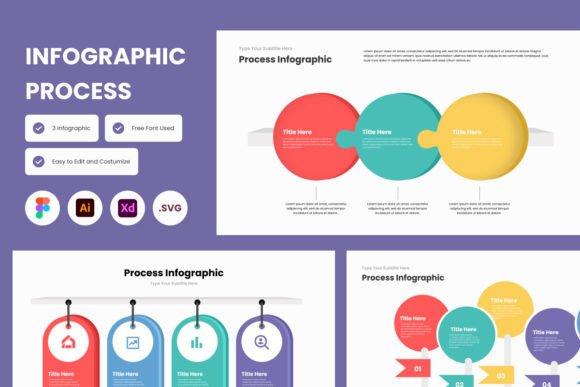
InfographInsight Process Infographic Template V1: Turn Complex Data into Clear, Actionable Visuals
If you have ever stared at a spreadsheet full of numbers or a wall of research notes and felt your brain glaze over, you already know why the InfographInsight Process Infographic Template V1 exists. It is not just a design file. It is a shortcut from information overload to genuine understanding. Whether you are mapping out a customer journey, breaking down a multi-step workflow, or trying to convince a skeptical stakeholder, the right visual structure changes everything.
This template gives you that structure without demanding you become a professional designer. It is a ready-made layout built to guide people through data step by step. Instead of dumping facts on someone, you lead them from point A to point B with clarity. And when people understand what they are looking at, they act on it.
What This Template Actually Does
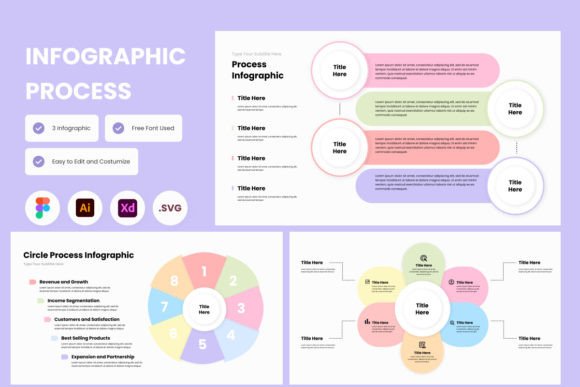
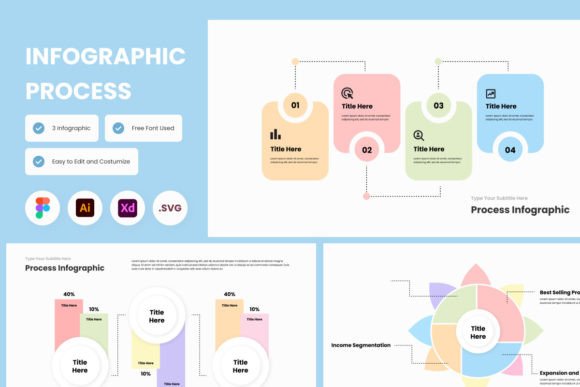
The InfographInsight Process Infographic Template V1 is a high-resolution screen layout designed to present processes, trends, and data flows in a way that feels natural rather than forced. It comes in .fig, .xd, .ai, and .svg formats, which means it works seamlessly across Figma, Adobe XD, Adobe Illustrator, and similar tools. The open source fonts give you flexibility without hunting down licenses or dealing with missing typefaces.
But the real value is not the file format. It is the fact that you can drop your content into a structure that already knows how to guide attention. The hierarchy is baked in. The visual rhythm is established. You just need to bring your insights.
Where and When People Reach for a Process Infographic
Process infographics are not decorative. They come into play during specific, high-stakes moments. Think about the last time you had to explain how something worked to a group of people with different levels of familiarity. Maybe it was a new onboarding flow for your team. Maybe it was a pitch to a client who needed to see the steps of a campaign before signing off. Maybe it was a workshop where participants kept getting lost in the details.
Those are the moments when a well-crafted infographic earns its keep. The InfographInsight Process Infographic Template V1 is built for exactly these scenarios. It helps you map out sequences, highlight decision points, and show cause and effect without relying on dense text that no one reads.
Scenario One: Explaining a Workflow to a New Team Member
You have a new hire starting next week, and you need them to understand how your content approval process works. You could send them a PDF with bullet points, or you could give them a visual that shows each stage, who is responsible, and where the handoffs happen. With this template, you can lay out the entire flow so they see the big picture first, then zoom into the details. They will remember it longer because they saw it, not just read it.
Scenario Two: Presenting Market Research to Stakeholders
Your team spent weeks gathering data on customer behavior. The CEO wants highlights in ten minutes. A dense slide deck will not work. A list of bullet points will not stick. But a process infographic that traces how customers move from awareness to purchase and where they drop off? That tells the story instantly. The InfographInsight Process Infographic Template V1 gives you the scaffolding to present trends and patterns without forcing your audience to work for them.
Scenario Three: Teaching a Multi-Step Concept in a Classroom or Workshop
Whether you are an educator running a business strategy course or a freelancer leading a client workshop, you face the same challenge: keeping people engaged while introducing complexity. A process infographic acts as a shared reference point. Your audience can follow along visually while you explain verbally. Questions become more specific because people know exactly where they lost the thread. This template makes that kind of teaching easier because the layout is already optimized for stepwise comprehension.
Different Users, Different Wins
One template serves many people, but not in the same way. Here is how the InfographInsight Process Infographic Template V1 shows up differently depending on who is using it.
For Marketers and Content Creators
If your job involves selling ideas, you know that trust is built on clear communication. A process infographic can show a lead exactly what your service looks like from start to finish. No ambiguity, no hidden steps. Marketers use this template to create one-page visuals that live on landing pages, in email sequences, or as downloadable assets. It answers the question every potential customer asks: How does this actually work for me?
For Small Business Owners and Entrepreneurs
When you run a lean operation, you do not have time to fiddle with design tools for hours. The InfographInsight Process Infographic Template V1 is adjustable by nature. You can swap colors, replace icons, and move elements without starting from scratch. Business owners use it for client proposals, operational handbooks, and even investor updates. It makes you look polished without requiring a design background.
For Educators and Trainers
Teaching is about reducing friction between the learner and the concept. A process infographic removes the friction of trying to hold multiple steps in working memory. Educators use this template to build study aids, course handouts, and lecture slides. The visual structure helps students connect ideas rather than just memorizing facts.
For Freelancers and Hobbyists
Freelancers often juggle multiple clients with different expectations. Having a reliable template means you can produce consistent quality without reinventing the wheel every time. Hobbyists use it for personal projects, family histories, or community presentations. The barrier to entry is low because the template works in familiar tools like Figma and Illustrator, and the open source fonts mean no awkward licensing issues.
What to Consider Before You Start Using It
A good template will not fix bad content. That is the first thing to understand before you download the InfographInsight Process Infographic Template V1. The template organizes your information, but you still need to decide what information matters. Take time to clarify your core message before you start dragging elements around. Ask yourself what you want someone to remember thirty seconds after they look at your infographic. If you cannot answer that, keep refining.
Another factor is audience. Who will actually see this? A graphic meant for internal team use can be dense and detailed. A graphic meant for a public-facing blog post needs to be scannable and visually inviting. The template can handle both, but you need to adjust the level of detail accordingly.
Also consider the medium. Are you designing for screen or print? The high-resolution layout works for both, but text sizes that look great on a monitor may feel small on a printed handout. Preview your work at actual size before you commit to a final version.
Finally, do not skip the step of testing the visual flow on someone who does not know the material. Ask them to walk through the process out loud based only on what they see. If they get stuck or misinterpret a step, you know exactly where to adjust. This kind of feedback is invaluable and often reveals assumptions you did not realize you were making.
How Features Connect to Real Outcomes
Listing features without context does not help anyone. So let me connect a few specific elements of the InfographInsight Process Infographic Template V1 to what they actually do for you in practice.
- High-quality screen layout design means your infographic looks professional even on large monitors or projected screens. That matters when you are presenting in a conference room or sharing a PDF with a decision-maker who judges credibility by polish.
- Design that is easy to adjust means you can customize the template to match your brand colors, typography, and visual tone without fighting the file. You save hours of tweaking and use that time on your actual message.
- Open source fonts mean you never hit a wall where your design breaks because someone does not have the right font installed. Sharing editable files with clients or collaborators stays smooth.
- Compatibility with Figma, Adobe XD, Adobe Illustrator, and more means you can work in the tool you already know. No learning curve, no forced migration. You just open the file and start building.
These features are not impressive in isolation. They become valuable when they save you from a specific frustration, like font rendering issues before a deadline or a client who cannot open your file. The template is designed to reduce those friction points so you can focus on what actually matters: communicating your insight clearly.
Driving Decisions Through Visual Clarity
The ultimate point of a process infographic is to drive a decision. You are not making art for its own sake. You are helping someone understand enough to say yes, to move forward, to allocate resources, or to change direction. The InfographInsight Process Infographic Template V1 supports that goal by giving you a structure that prioritizes understanding over decoration.
When your audience can see the path from where they are to where they want to be, they trust the process. And when they trust the process, they are far more likely to act on your recommendations. That is the practical outcome this template enables.
Whether you are a marketer mapping a campaign, a freelancer laying out deliverables, an educator planning a curriculum, or a small business owner explaining your value proposition, the way you present information determines how it lands. A cluttered, disorganized visual creates confusion. A clear, stepwise infographic creates confidence.
Invest the time upfront to organize your content, choose the right level of detail, and tailor the template to your audience. You will end up with something that works harder than a page of text ever could. And that is exactly what a good template should help you do.