Sport Slide Infographic Presentation Template: An Objective Evaluation for Your Next Project
Creating a professional, visually compelling presentation often requires significant time, design skill, and attention to detail. For those working in sports-related fields—whether coaching, sports journalism, athletic administration, fitness training, or sports marketing—the need for clear, dynamic visuals is especially high. The Sport Slide Infographic Presentation template is a resource designed to address this need, offering a pre-built structure for crafting slides that communicate data, strategies, and narratives effectively. This article provides a balanced evaluation of what this template offers, helping you determine whether it aligns with your specific goals, workflow, and budget.
What Is the Sport Slide Infographic Presentation Template?
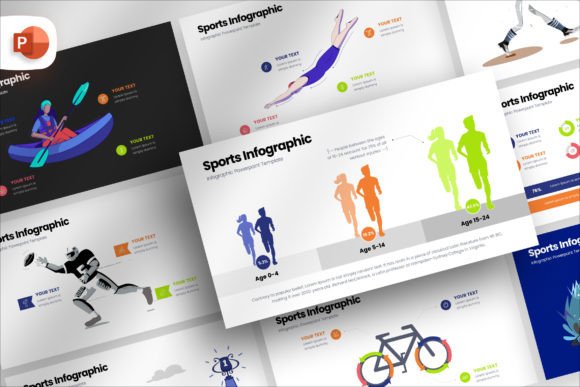
At its core, the Sport Slide Infographic Presentation Template is a collection of 87 unique slide layouts built for PowerPoint. It is intended for users who need to present sports-related content—such as game statistics, player performance metrics, training regimens, league standings, or promotional material—in a visually engaging format. The template uses a standard 16:9 aspect ratio, fitting most modern screens and projectors. Key features include drag-and-drop picture placeholders, fully editable shapes and colors, and a documentation file to guide setup.
The package emphasizes ease of customization: users can adjust shape color, size, position, and transparency without needing advanced design skills. It also includes mockup device slides where you can insert screenshots or images into pre-made device frames. Notably, the template does not include stock images, so you will need to supply your own photos or graphics.
Reasons to Consider This Template
Understanding why someone might be drawn to the Sport Slide Infographic Presentation helps frame the evaluation. Several common scenarios emerge:
- Time constraints: Building a presentation from scratch is time-consuming. A template with 87 pre-designed slides reduces the upfront design work significantly.
- Limited design experience: Not everyone has a graphic design background. This template provides a professional starting point that can be customized without deep software knowledge.
- Consistency across presentations: For recurring reports or multiple presentations, having a unified visual theme saves effort and strengthens brand recognition.
- Need for infographic-style data display: Sports data often involves comparisons, trends, and percentages. Infographic layouts can communicate these more clearly than standard bullet points.
These motivations are practical and widespread. However, the value of any template depends on how well it matches the user's specific context and expectations.
Benefits: What the Template Does Well
The Sport Slide Infographic Presentation Template offers several genuine advantages for the right user.
Extensive Slide Variety
With 87 unique slides, the package covers a wide range of layouts. You are likely to find options for title slides, section dividers, data charts, comparison tables, timeline graphics, and image-heavy spreads. This variety means you can assemble a complete presentation without repeating the same layout multiple times, which helps maintain audience attention.
Ease of Customization
The drag-and-drop picture placeholders are straightforward: you insert an image into a designated area, and the template automatically adjusts size and position. Shape colors, transparency, and sizes are editable, allowing you to match your team colors, brand guidelines, or personal preferences. The free license for included fonts removes a common licensing headache.
Professional Aspect Ratio
The 16:9 aspect ratio is the current standard for most laptops, monitors, and projectors. This ensures your presentation fills the screen correctly without black bars or distortion, which is a small but important detail for a polished result.
Mockup Device Slides
Including device mockups—such as a laptop or tablet frame where you place your screenshot—adds a modern, polished touch for presentations about apps, websites, or digital tools. This feature is particularly useful for sports technology or analytics demonstrations.
Tradeoffs and Considerations
No template is without limitations. A balanced evaluation requires acknowledging what the Sport Slide Infographic Presentation does not offer or where it may fall short.
No Included Stock Images
The package explicitly states that no stock images are included. If you lack access to high-quality sports photos, you will need to source them separately, which adds time and possibly cost. For users expecting a complete "fill in the text" solution, this is a notable gap.
PowerPoint Dependency
The template is designed for PowerPoint. If your workflow relies on Google Slides, Keynote, or other presentation software, you may face compatibility issues or lose some formatting during conversion. Users in team environments where software choices vary should verify cross-platform behavior before committing.
Learning Curve for Full Customization
While basic edits are simple, fully customizing shapes, colors, and layouts requires familiarity with PowerPoint's advanced features. Users who are entirely new to the software may need to invest time in learning how to navigate the template's layers, master slides, and grouped elements.
Potential for Generic Look
Because templates are used by many people, there is a risk that your presentation could look similar to others who have purchased the same package. If uniqueness is critical—for a high-stakes pitch or a major conference—you may need to invest additional customization to differentiate your slides.
When Is This Template a Strong Fit?
The Sport Slide Infographic Presentation Template is most likely to meet your needs in the following situations:
- Regular reporting: If you produce weekly or monthly performance reports for a team, league, or organization, the template can streamline a repetitive task.
- Educational settings: Coaches teaching game strategies, athletic directors presenting budget summaries, or sports medicine staff explaining training protocols can benefit from clear infographic layouts.
- Internal team presentations: For meetings where polish matters but extreme uniqueness is not required, the template offers a solid balance of quality and efficiency.
- Solo presenters: Individuals who handle their own slides—without a design team—will appreciate the reduced workload.
When Alternatives May Be Worth Considering
There are scenarios where other solutions might serve you better than this specific template.
Custom Design Services
If your presentation is for a high-stakes external audience—such as a sponsorship proposal, a keynote at a major sports conference, or a media pitch—investing in a custom presentation design from a professional may yield a more distinctive and strategically tailored result. The cost is higher, but the impact can be greater.
Other Presentation Templates
Many marketplaces offer sports-themed templates with different design aesthetics, numbers of slides, and included features. Some include stock images, animated elements, or compatibility with multiple software platforms. Comparing several options before purchasing is advisable.
Building from Scratch
For those with strong design skills and a clear vision, starting from a blank presentation allows complete creative control. This approach avoids any template limitations and ensures every slide serves a specific purpose. However, it requires the most time and effort.
Specialized Data Visualization Tools
If your presentation is heavily data-driven—for example, showing advanced player statistics or complex team performance metrics—dedicated data visualization software (such as Tableau, Flourish, or even Excel charts) may produce clearer and more interactive graphics than a static slide template can achieve. You can then import these visuals into a simpler presentation framework.
Practical Decision-Making Insights
To determine whether the Sport Slide Infographic Presentation Template is right for you, consider the following steps:
- Assess your available time. If you have at least a few hours to customize the template and source your own images, the package can save you from starting at a blank screen. If you have very little time, the need to find images might offset the time savings.
- Evaluate your design confidence. Are you comfortable with basic PowerPoint functions like editing shapes, changing colors, and working with master slides? If yes, the template is likely manageable. If not, factor in learning time or consider a more guided solution.
- Consider your audience. For internal or routine presentations, the template's professional look is sufficient. For high-visibility external presentations, weigh the risk of a generic appearance and plan for additional customization.
- Review the slide previews. Before purchasing, carefully examine the sample slides to ensure the visual style matches your brand and content type. The template's aesthetic should align with the tone you want to convey—modern and clean, or bold and energetic.
- Check compatibility. Confirm that all team members or collaborators can use PowerPoint or that the template converts acceptably to your preferred software.
Final Thoughts on the Sport Slide Infographic Presentation Template
The Sport Slide Infographic Presentation template is a practical tool for individuals and teams who need to produce sports-related presentations efficiently without sacrificing visual quality. Its 87 unique slides, straightforward customization, and standard aspect ratio make it a solid choice for many common scenarios, especially regular reporting and internal communications. However, the lack of included images, dependency on PowerPoint, and potential for a less distinctive look are factors that deserve honest consideration.
By evaluating your specific needs—your timeline, design skills, audience expectations, and content requirements—you can decide whether this template offers the right balance of convenience and quality. For those whose circumstances align with its strengths, it can be a valuable addition to their presentation toolkit. For others, exploring alternative templates, custom design, or building from scratch may lead to a better outcome. The key is to choose based on your goals, not on promotional claims, and to approach the decision as one of matching a tool to a task.