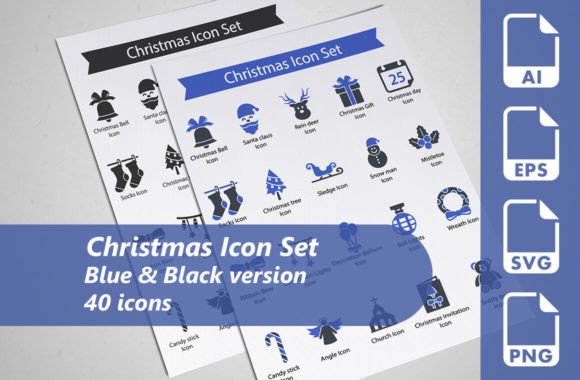
Christmas Icon Set: A Complete Design Asset for Holiday Projects
Designers and developers know the rush that comes with seasonal projects. The holiday season demands visuals that connect emotionally, communicate clearly, and stand out across every medium. A carefully crafted Christmas icon set solves that challenge beautifully. When you have forty meticulously designed icons at your disposal, with multiple formats and color variations, your workflow transforms from scrambling for assets to assembling polished designs with confidence.
This article explores what makes a dedicated Christmas icon set valuable, how it fits into modern design workflows, and why the combination of format flexibility, color options, and thoughtful iconography matters more than you might expect.
What Makes a Christmas Icon Set Essential for Holiday Design
The holiday season brings a surge of design work. Websites need festive banners. Social media campaigns require themed graphics. Printed materials such as greeting cards, flyers, and promotional brochures demand seasonal touches. Presentations benefit from cheerful icons that reinforce messaging. Even infographics and illustrations often incorporate holiday elements to make content timely and relevant.
A comprehensive Christmas icon set serves as the backbone for all these projects. Instead of sourcing individual images from scattered locations, you have a unified collection that shares consistent style, weight, and visual language. This consistency is important because mixing icons from different sources often results in mismatched aesthetics that undermine professional quality.
The set discussed here includes forty icons spanning classic holiday imagery. Think of the symbols you expect during Christmas: ornaments, snowflakes, stockings, candy canes, bells, presents, reindeer, Santa elements, and more. Each icon is designed with care, ensuring clear recognition even at small sizes. That level of detail matters whether you are placing an icon in a website navigation menu or scaling it up for a poster.
Two Versions, Double the Creative Control
One standout feature of this particular Christmas icon set is the inclusion of two complete versions: one in blue and one in black. That means you actually receive forty unique icon designs, with each icon appearing in both color options, totaling eighty usable assets across both versions.
Why does this matter? Color flexibility changes how you approach a project. Blue icons evoke calm, wintery aesthetics. They work beautifully for backgrounds, light themes, or designs that aim for a serene holiday mood. Black icons offer high contrast and bold presence. They excel in headers, dark mode interfaces, or print materials where strong visibility is needed. Having both versions means you can switch between them depending on the context without recreating anything from scratch.
This dual-color approach also supports brand consistency. If your brand palette leans toward cool tones, the blue version integrates seamlessly. If your design uses monochrome or high-contrast layouts, the black version fits naturally. You are not locked into a single aesthetic. You simply choose the version that works best for each specific application.
Practical Scenarios for Each Color Version
Consider a website redesign for the holiday season. The homepage banner might feature a blue background with white snowflake accents. Blue Christmas icons complement that palette without clashing. In the same site, the footer or call-to-action buttons might use black icons for emphasis and legibility. Both versions serve distinct purposes within a single project.
For printed materials, the choice becomes even more straightforward. Business greeting cards with a navy blue theme benefit from matching blue icons. Flyers distributed at holiday events often look sharper with black icons against white or cream paper. Presentations projected in bright rooms need the contrast that black icons provide, while digital slides in dim environments feel more cohesive with blue tones.
File Formats That Support Every Workflow
An icon set is only as useful as its format accessibility. This collection addresses that concern by providing multiple file types designed for different stages of the design process.
Vector AI files are fully editable. If you need to adjust a color, resize an icon without losing quality, or combine elements into a custom composition, the AI format gives you complete control. Adobe Illustrator users can open these files, modify anchor points, change stroke weights, and adapt each icon to precise project requirements. This level of editability is invaluable when clients request subtle adjustments or when your design vision requires something slightly different from the original.
SVG files have become the standard for web and interface design. They scale infinitely, remain lightweight, and integrate directly into HTML and CSS workflows. Developers appreciate SVG because it eliminates the need for multiple image sizes and maintains crisp rendering on retina displays. If you are building a responsive website, SVG icons load fast, look sharp at any resolution, and can be styled programmatically through code.
EPS files with EPS10 compatibility serve users working in legacy design software or production environments that require this format. Print shops often request EPS for high-resolution output. Having an EPS version ensures your icons are ready for professional printing without conversion issues.
Transparent PNG files provide immediate usability for anyone who needs raster images without background interference. Drop them into presentations, social media graphics, or document templates without masking or cutting. Transparent PNGs are the quickest way to use icons when you just need to get a project done without opening a vector editor.
This combination of formats covers virtually every use case. Whether you are coding a website, designing a brochure, preparing a slide deck, or illustrating an infographic, you have the appropriate file type ready.
Practical Benefits for Design Projects
A well-designed Christmas icon set does more than save time. It elevates the overall quality of your work. Here are specific ways these icons contribute to better design outcomes:
Consistency across mediums. When you use the same icon set for your website, printed flyers, and presentation slides, your audience experiences a cohesive visual identity. The holiday theme feels intentional rather than tacked on. This consistency builds trust and recognition, especially in brand campaigns that span multiple channels.
Scalability without compromise. Because the icons are vector-based, you can size them from as small as 16 pixels for interface elements to as large as full-page illustrations. The geometry of each icon is constructed to remain clear and recognizable at any scale. This is not always true for free or low-quality icon sets, where fine details disappear when shrunk or become jagged when enlarged.
Professional polish. Meticulously designed icons have balanced proportions, appropriate stroke widths, and harmonious visual weight. They look intentional. Whether you are a seasoned designer or someone who needs holiday visuals for a client project, starting with quality assets reduces the gap between amateur and professional results.
Time savings. Creating custom icons from scratch takes hours. Editing mediocre icons to make them usable takes almost as long. A ready-to-use set that is already beautifully designed lets you skip both steps. You open the file, select the icon you need, place it into your layout, and move on to the next task. For tight deadlines, that speed is a practical necessity.
How This Icon Set Fits Into Modern Design Workflows
Design today happens across disciplines. A single project might involve a web designer, a print specialist, a motion graphics artist, and a social media manager. The Christmas icon set accommodates all these roles through its format variety and color options.
A web developer can drag SVG files directly into code. A print designer can open EPS files in InDesign or Illustrator and adjust colors using the AI source files. A social media manager can use transparent PNGs for quick graphics without needing design software. This cross-functional accessibility means the entire team can work from the same visual library, maintaining consistency even when tasks are divided.
For freelancers and small agencies, the versatility is especially valuable. You might design a website in the morning, create a presentation in the afternoon, and format a promotional flyer in the evening. Having one icon set that works across all these outputs eliminates the need to purchase or download separate assets for each task.
Considerations Before Choosing a Christmas Icon Set
Not all icon sets deliver the same value. When evaluating options, pay attention to the number of icons included, the variety of imagery, and the quality of the design. A set with forty icons offers enough breadth to cover most holiday concepts without being overwhelming. Blue and black color options provide immediate flexibility that single-color sets lack.
File format support is another practical factor. Ensure the set includes vector formats for scalability and raster formats for quick use. The combination of AI, SVG, EPS, and transparent PNG is ideal because it leaves no gaps in your workflow.
Editability matters if you anticipate needing custom modifications. Fully editable AI files allow you to change colors, adjust proportions, or combine icons into new compositions. If you ever find yourself wanting a slightly different snowflake or a variation of a gift box, you can create it without starting from nothing.
The design itself should feel modern but timeless. Holiday icons that rely on overly trendy styles may look dated after one season. Clean, balanced iconography with classic holiday motifs remains relevant year after year.
Real Applications Across Industries
E-commerce sites use Christmas icons to highlight holiday sales, decorate category pages, and reinforce seasonal messaging in email campaigns. Retailers often place icon accents near shipping deadlines, gift guides, or special promotions.
Event planners incorporate icons into invitations, programs, signage, and social media promotions for holiday parties, corporate gatherings, and community events. A cohesive icon set ties all these materials together visually.
Educators and trainers use holiday icons in presentations, handouts, and digital content to make seasonal topics more engaging. Even internal company communications benefit from festive visuals that boost morale and celebrate the season.
Content creators and bloggers rely on icons to illustrate articles, create featured images, and design downloadable resources for their audiences. Quality icons improve the reading experience and make content more shareable.
Final Thoughts on Building Your Holiday Design Library
A Christmas icon set is more than a collection of pretty graphics. It is a practical tool that supports efficiency, consistency, and professional quality across all your holiday projects. When you invest in icons that are meticulously designed, available in multiple formats, and offered in both blue and black versions, you are setting yourself up for smoother workflows and better results.
The forty icons in this set cover the essential symbols of the season, and the inclusion of AI, SVG, EPS, and transparent PNG files means you can use them immediately in any context. Whether you are designing for a client, your own brand, or a personal project, having reliable, beautiful assets available from the start makes the entire creative process more enjoyable. Consider how these icons might fit into your next holiday design, and you will likely find that they become a go-to resource for years to come.