Choosing the Right Travel Vacation Icon Set for Your Design Projects
When you are working on a travel website, a tourism brochure, or a promotional infographic, icons are often the quickest way to communicate ideas without cluttering the page. A well-made Travel Vacation Icon Set can save you hours of illustration work while keeping your visuals consistent and professional. The set described here offers 120 travel vacation icons, available in two color versions, and provides multiple file formats for different design environments. But is it the right choice for your specific project? Let us look at what this set includes, how it compares with other approaches to acquiring icons, and what factors you should weigh before making a decision.
What the Travel Vacation Icon Set Offers
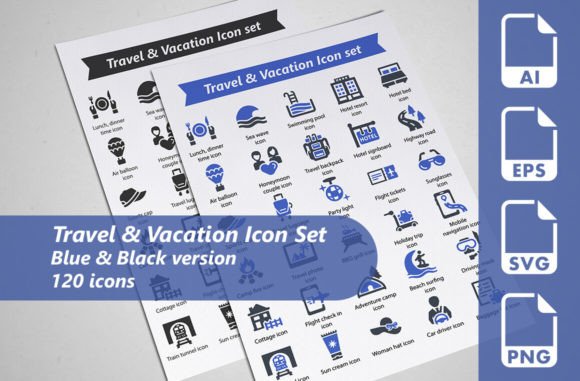
This particular icon set gives you 120 individual travel-themed icons. They cover common vacation symbols such as luggage, airplanes, hotels, beaches, maps, and landmarks. What makes it distinct is the inclusion of two complete versions: one in blue and one in black. That means you get 60 icons in each color scheme, totaling 120 icons overall. Having both color options in one purchase can be practical if you need a consistent look across different brand palettes or if you want to offer light and dark mode versions of your design.
File format variety is another strength. You receive fully editable vector AI files, plus separate SVG files (128×128 pixels), EPS files (256×256 pixels), and transparent PNG files (256×256 pixels). This range means you can use the icons in almost any workflow, whether you are working in Adobe Illustrator, a web development environment that prefers SVGs, or a presentation tool that requires ready-to-use PNGs. The inclusion of EPS10 versions also ensures backward compatibility with older vector software.
Comparing Pre-Made Icon Sets with Other Options
When you need travel icons, you generally have three routes: purchase a curated set like this one, download free icon packs from open libraries, or commission custom illustrations. Each approach has tradeoffs, and the best choice depends on your timeline, budget, and quality requirements.
Free icon packs are widely available and cost nothing upfront. However, their quality and consistency vary significantly. You may find that the icons use different line weights or visual styles, which creates a disjointed look when placed together. Licensing terms can also be restrictive, sometimes requiring attribution or prohibiting commercial use. The Travel Vacation Icon Set here is a commercial product, so it is meant for professional use without attribution concerns, and the uniform design language across all 120 icons helps maintain visual harmony.
Custom illustration gives you total creative control, but it is time-intensive and expensive. If you need a handful of very specific icons that no set covers, custom work might be justified. But for most travel-related projects, a set of 120 pre-made icons will cover the vast majority of common symbols. The tradeoff is that you are working within the illustrator’s style, so you cannot request individual modifications. However, because this set provides fully editable AI files, you can tweak colors, resize elements, or adjust details yourself, which blends some of the flexibility of custom work with the efficiency of a pre-made set.
Subscription-based icon services are another alternative. They give you access to thousands of icons for a monthly fee, often with consistent styling across many categories. If you work on diverse projects that require icons for multiple industries, a subscription might offer better long-term value. But if you primarily work in travel and tourism, a one-time purchase like this set could be more cost-effective than paying ongoing fees for icons you rarely use outside one sector.
Strengths of This Travel Vacation Icon Set
The first notable strength is the dual-color system. Many icon sets only offer a single color, often black or white. Having both blue and black versions gives you flexibility without needing to adjust colors manually. For example, you could use the blue icons on a light background and the black icons on a colored overlay, keeping readability and brand alignment intact.
The vector file availability (AI, SVG, EPS) is another practical advantage. Vector formats scale to any size without losing quality, which is critical if you need the same icon on a small mobile button and a large poster. The PNG versions at 256×256 pixels are useful for quick placement in documents or web mockups where vector editing is not required.
Consistency in design is often overlooked until you try to mix icons from different sources. A set of 120 icons drawn by the same designer will share stroke weights, corner radii, and visual proportions. This consistency makes your final design look polished and intentional, rather than cobbled together.
Where It May Fall Short
No single icon set can cover every possible need, and this one is no exception. The travel niche is broad, and while 120 icons cover many common concepts, you may find gaps for more specific activities such as scuba diving, skiing, or cultural festivals. If your project requires niche symbols, you might need to supplement this set with additional icons or create your own.
The resolution of the PNGs is 256×256 pixels, which is suitable for many digital uses but may be too small for large print formats. If you are designing a billboard or a large banner, you would want to use the vector files instead. That is fine as long as your workflow includes vector editing tools, but if you only have access to raster editing software, you might have to upscale the PNGs, which can introduce pixelation.
Another consideration is the color palette limitation. You get blue and black versions, but if your brand uses a different primary color, you will need to edit the AI files to change the hue. The vector files are fully editable, so this is possible, but it does require some familiarity with Illustrator or equivalent software.
Best-Fit Use Cases
This icon set works well for a range of projects where travel is a central theme. Some realistic examples include:
- Tourism websites: Use the SVGs directly in web code for responsive icons on booking pages, destination listings, or service features.
- Printed travel brochures: Place the EPS files into layout software like InDesign for crisp printing at any size.
- Presentations: Drop the transparent PNGs into PowerPoint, Keynote, or Google Slides for instant visual cues without further editing.
- Infographics: Combine multiple icons to illustrate travel statistics, itineraries, or comparison charts with a unified look.
- Promotional materials: Use the black version to match a darker design or the blue version to add a splash of color.
The set is particularly well suited for projects that demand quick turnaround. If you need to produce a travel guide or a hotel website in a week, having a ready-to-use icon library eliminates the time spent on illustration or searching through fragmented free collections.
When You Might Need an Alternative
There are situations where this set may not be the ideal fit. If your project covers multiple industries beyond travel, a larger multi-category icon subscription might serve you better. Similarly, if you require highly stylized or custom-branded icons that match a very specific visual identity, commissioning an illustrator could be the better route, even though it costs more.
For designers who work exclusively in web development and prefer lightweight icon fonts or SVG sprites, you will find the individual SVGs in this set perfectly usable. However, if you need an icon font format (WOFF, TTF) for easy implementation via CSS, this set does not provide that, so you would need to convert the SVGs yourself or look for a font-based solution.
Another scenario is when your project has a very tight budget and you can tolerate less consistency. Free icon sets from sources like The Noun Project or Flaticon can be mixed with attribution, but you sacrifice uniformity and may face licensing limitations for commercial work. The paid set here removes those worries, but it requires an upfront investment.
Factors to Consider Before Deciding
Start by evaluating the scope of your project. List the specific travel icons you need. If the list aligns closely with the 120 symbols in this set, it is likely a strong match. If you find yourself needing many icons that are not included, calculate whether the time spent editing or supplementing is worth the cost savings over custom work.
Consider your team’s technical skills. If you or your team are comfortable editing vector files in Illustrator, the AI and EPS formats give you enormous flexibility. If you rely solely on raster tools, the 256×256 PNG size may be limiting, and you might prefer a set that offers higher-resolution raster images out of the box.
Also think about long-term usage. A one-time purchase gives you perpetual access to the icons, unlike a subscription that requires ongoing payments. If you anticipate needing travel icons for multiple projects over several years, buying a set like this one is often more economical than paying a monthly subscription fee.
Finally, check the licensing terms of any icon set before buying. Most commercial sets allow use in web, print, and digital products without attribution, but it is always wise to confirm that your intended use is covered. The description here suggests broad commercial use, but you should verify the full license for any set you consider.
Making an Informed Choice
The Travel Vacation Icon Set with 120 icons in two color versions offers a practical middle ground between free collections and custom illustration. Its strength lies in consistency, format variety, and immediate usability across web and print projects. For many travel-related design tasks, it provides enough coverage to avoid the need for additional sourcing, while the editable vector files give you wiggle room to adapt the icons to your exact needs.
If your project is focused on travel, your timeline is moderate to tight, and you value a uniform visual language, this set is a solid option. If your needs are broader in scope or style, you may want to explore subscriptions, icon fonts, or custom illustration. The key is to match the tool to the task, and understanding what this set includes and where it has limits will help you make that decision with confidence.